
A 65 W USB-C charger can be a good fit for your laptop when it’s the only thing plugged in. Add your phone, though, and that same laptop port might top out at 45 W. If you’re buying one charger for both devices, the number to shop by is the wattage your laptop gets while both are connected.
Read the row for the ports you’ll actually use
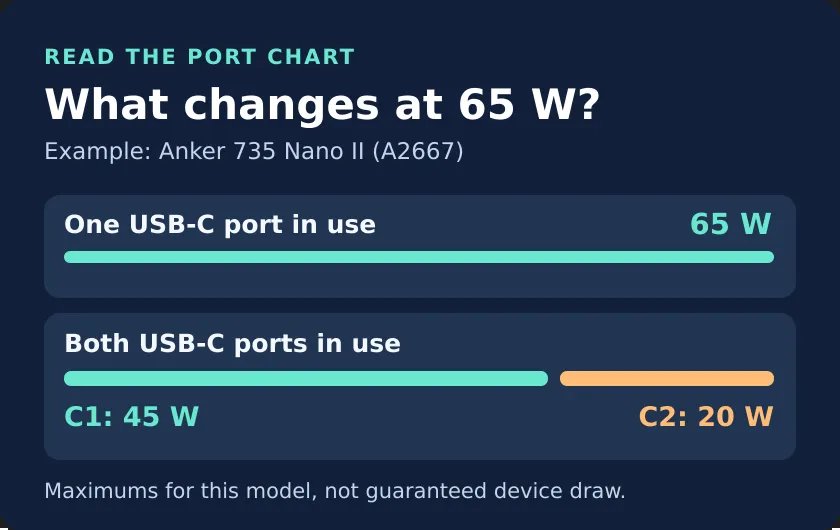
Look for a chart called “power distribution,” “output,” or “ports in use” on the manufacturer’s page for the exact model. On Anker’s 735 Nano II (model A2667), either USB-C port can supply up to 65 W on its own. With both USB-C ports in use, the first port tops out at 45 W and the second at 20 W. Adding a device to the USB-A port changes that split again. These are the manufacturer’s limits for this model, not a rule for all 65 W chargers.
Match the laptop, charger and cable
Start with your laptop maker’s charging guidance for your exact model. If it recommends 65 W and you want that level of charging with your phone plugged in, look for at least 65 W on the laptop’s port in the two-port row. A lower-wattage port may still charge the laptop but can take longer, especially while you’re using it. For fast charging, check which charging standard your device specifies, such as USB Power Delivery (USB PD).
Check the cable’s power rating, too. A USB-C cable rated for 60 W can’t deliver the full 65 W just because the charger can. USB-IF’s certified cable markings distinguish 60 W and 240 W; the connector shape alone doesn’t tell you the rating.
The TechieDeals Take
Before you buy, find the output chart, pick your port combination and check the laptop’s share. If the seller only shows the total wattage, look up the exact model on the manufacturer’s site. You may not need a bigger charger. You need one that sends enough power to the right port.
Source notes: Anker 735 Charger (Nano II 65W), A2667 output specifications; Apple Support, “Use a power adapter with your Mac”; USB-IF, “Cables and Connectors.”